Get my website

Websites for HVAC companies

A professional website for your HVAC company.

Installs, tune-ups, seasonal service and emergency calls, on one framework built to get a homeowner to pick up the phone. One online form, then live within 72 hours.

$59 one-time setup, then $99/mo. for 12 mo. or $169/mo. with no commitment. No sales calls.

Every HVAC visitor wants one of three things.

Somebody with no heat wants a number. Somebody replacing a system wants reasons. Somebody planning a tune-up wants to know you do it and how to book. The framework gives each one its own place.

No heat. No cool. Right now.

They are on a phone and not having a good day. Your number is a button in the navigation, a button in the hero, and a Call Now pill that stays pinned at the bottom right as they scroll. On a phone, it stays under their thumb.

A new system, and a lot of questions.

They are comparing companies. What you install, why they should trust you, whether you cover their town, and what it is like to work with you. Services, four trust badges, a why choose us band, a service area with six cities and seven FAQs, each in its own section.

A tune-up before the season turns.

They want to know you offer it, what it includes, and how to book. A service card describes it, a differentiator says why it matters, and a Call Now button books it. If you sell a maintenance plan, this is where you describe it.

Your services, in four cards.

The services section holds four cards, each with a photo, a name and a short description, under a headline and a one-line promise, with a Call Now button below. Four is the structure. What you call them is up to you.

Most HVAC companies group them: cooling, heating, maintenance, and either emergency service or indoor air quality. The description line carries the specifics, so a card called Heating can name furnaces, heat pumps and boilers, and a card called Maintenance can say what a tune-up covers and that you offer a plan. Anything that does not fit in four gets a line in the FAQ, the about section or the why choose us band.

The services section: a What we do eyebrow, the headline Services Built to Last, four cards each with a photo, a [Service] name and a short description, and a Call Now button.

The services section, before your details go in. Four cards, your photos, your wording.

Same framework. Your trade.

Every Horizon website uses this framework. Your name, colors, photos and text go in; the structure stays. Scroll it, and pick a trade to switch.

The whole framework on a desktop, as it ships, with sample text.

Desktop. Scroll inside the frame.

The whole framework on a phone, as it ships, with sample text.

Phone. Scroll inside the frame.

The framework exactly as it ships, with sample text and sample photos. Scroll either frame.

Everything else an HVAC customer checks.

Whether you are legitimate, what happens if they call after hours, and the questions they ask before they book. The framework has a fixed spot for each. The screenshots show it before personalization, with text in brackets where your details go.

Trust, four ways.

The trust strip under the hero holds four badges: licensed and insured, a warranty, years in business, and a certification or a brand you are authorized to install. Further down, the why choose us band gives eight reasons to choose you with a line on why each one matters to a homeowner, the about section tells your story with an Est. [Year] badge, and the gallery shows eight photos of your work. Eight finished installs say more than one photo of the truck.

The why choose us section: a dark band with the headline Built on Trust, Backed by Results and eight white cards in two rows of four, each a [Differentiator] title with one line on why it matters to the customer.

The why choose us band. Eight reasons, and why each one matters.

Emergency calls and hours.

If you take after-hours or emergency calls, say so where it counts: in the eyebrow line above the headline, as one of the four badges, as a differentiator, or as a service card of its own. The closing call to action repeats your phone, your email and your business hours, and the hours can read however you run, including a separate line for nights and weekends.

The contact section: a Get started eyebrow, [Closing CTA Headline], then phone, email and hours side by side, and a Call Now button.

The closing call to action. Phone, email and hours, one more time.

The questions you answer every day.

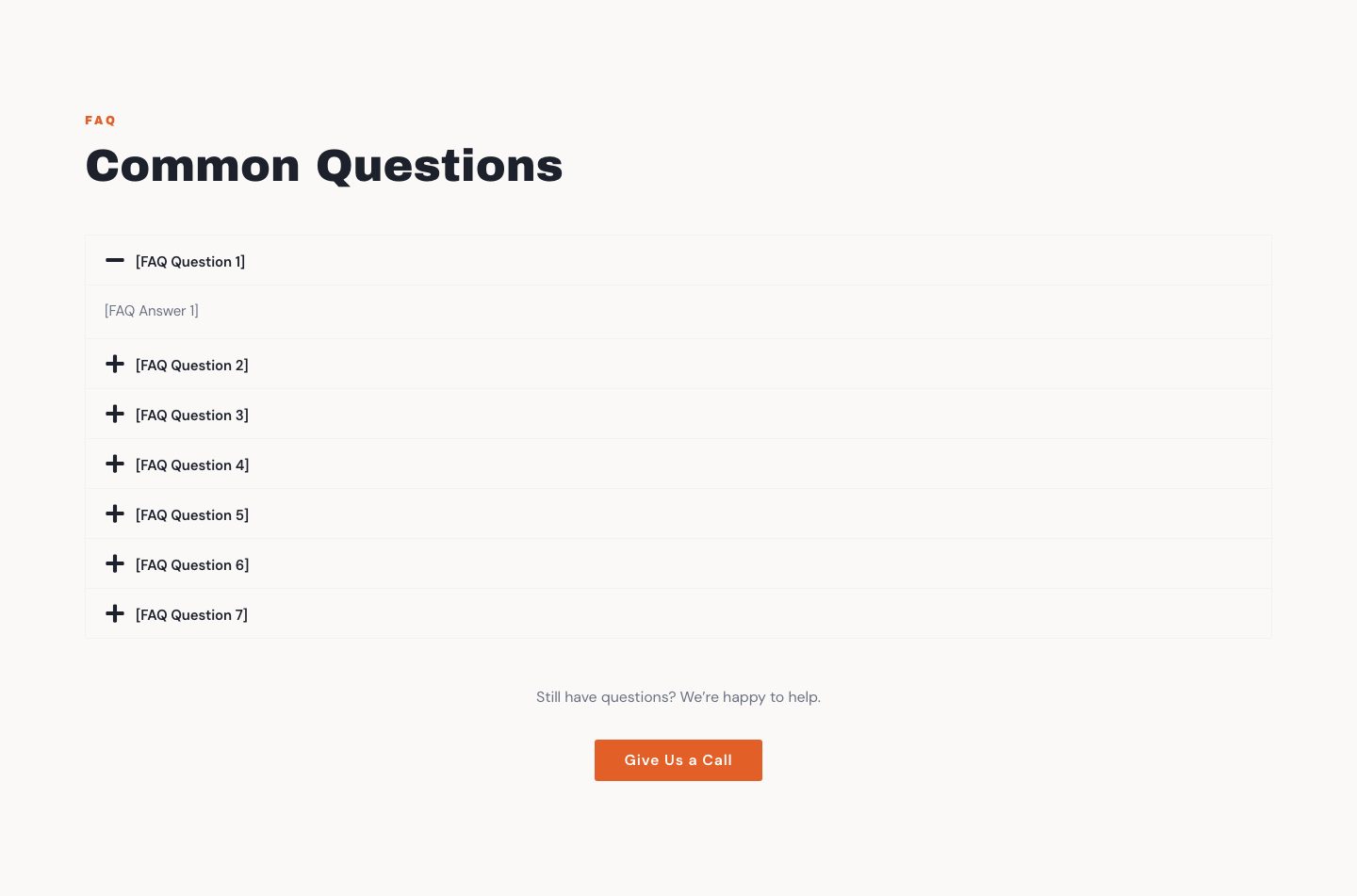
The FAQ holds seven questions in an accordion, then Still have questions? with a call button. HVAC owners tend to get the same ones: how often a system needs service, whether to repair or replace, what a tune-up includes, how long an install takes, which brands you carry, and whether you offer financing. Answer them once here, in the words you use on the phone, and the calls get shorter.

The FAQ section: the headline Common Questions and seven questions in an accordion, then Still have questions? with a Give Us a Call button.

The FAQ. Seven questions, your answers.

Or see the live framework. It shows placeholder text in brackets where your details go.

Change the headline when the season does.

Your text, photos, colors and business info are yours to edit anytime through a simple editor, no code. Put a tune-up reminder in the hero in April, switch it to no-cool service in July, and go back to furnace checks in October. The framework stays put; the words are yours.

On a phone, the same sections stack in one column: a large headline, full-width buttons, and the Call Now pill within reach of a thumb. That is the screen a homeowner reaches for when the system quits.

The first screen of the framework on a phone: [Business Name] and a menu button at the top, then the full-width photo with [Client H1 Headline], a full-width Call Now button and a round Call Now button.

The first screen on a phone. Headline, two buttons, and the pill.

What a visitor does on your page.

One short path, from the first screen to a phone call. The sections above are the places it runs through.

They land.

The system quit, and a homeowner searches on a phone. The hero names your trade and area, and a round Call Now button stays within reach of a thumb.

They check.

The trust items say who you are. The service cards show installs, tune-ups and emergency calls, and the service area lists their town.

They reach out.

One tap calls you. Get In Touch takes them to your phone, email and hours.

Be live before the first hot week.

Cooling and heating both have a first hard day each year. Have the site live before that day, then change the headline for the season when it turns. The clock on "live within 72 hours" starts when you finish the online form, and it depends on how quickly you provide content and approve the preview. Leave yourself some room before the date you want to be live.

The rest of the wording, written out.

The sections above show the hero, trust items, services and service area. Here is everything else, start to finish, written for Northline HVAC, a made-up Twin Cities heating and cooling company that is not a client. It is example wording only. You enter your own on the online form, and you can change any of it later.

About

Heating and cooling for the Twin Cities.

We are a small HVAC company that keeps homes across Minneapolis and St. Paul comfortable all year. Furnace tune-ups, air conditioner repairs and system replacements are most of our week.

We tell you what is wrong in plain words, and we tell you whether a repair or a replacement makes more sense. You decide, and the price is in writing before we start.

Certifications and licenses: Licensed and insured in Minnesota.

Badge: Est. 2012. Plus a photo of you or your crew.

Why choose us

Eight reasons, one line each.

  • Straight answers on repair or replaceWe tell you what we would do in your house.
  • Seasonal tune-upsA check before the cold or the heat, not after the breakdown.
  • Emergency calls answeredNo heat in January is not a problem that can wait.
  • Price in writing firstNo surprises on the invoice.
  • Licensed and insuredProof on request.
  • Clear explanationsNo jargon, and a plain list of what we found.
  • Respect for your homeBoot covers and a tidy finish.
  • Local techniciansThe people who answer are the people who show up.

Call-to-action band

Heat or air not working?

Emergency calls answered. Price in writing before we start.

Plus a Get In Touch button and a Call Now button.

Closing section

Tell us what your system is doing.

Under the headline: your phone, email and business hours, and a Call Now button.

Seven questions, answered.

How often should my system be serviced?

Once a year is a good habit. Many people do the furnace in the fall and the air conditioner in the spring.

Should I repair or replace?

It depends on the age of the system, the cost of the repair and how it has been running. We will tell you what we would do and why.

What does a tune-up include?

We clean and check the main parts of your system and tell you what we find. You get a plain list of anything that needs attention.

How long does an installation take?

Most replacements take about a day. We will give you a timeline when we quote the job.

Which brands do you install?

We install a small number of brands we trust and can support. Ask us when you request a quote, and we will explain the options.

Do you offer financing?

We can walk you through payment options when we quote an installation. Ask us when you call.

What areas do you cover?

Minneapolis, St. Paul and the nearby suburbs. If you are not sure, call and ask.

Made-up example business, not a client. Example wording only; you enter your own.

What this framework doesn't do.

It is a website that gets people to call or ask. Here is what it is not, so nothing surprises you later.

  • It is one page.Sections you scroll through, not a site with a separate page for every service, and not a blog.
  • The structure does not change.Four service cards, six cities, eight photos, eight reasons to choose you, four trust items and seven FAQs, in the same order. You change what they say, not how many there are.
  • It does not run your service agreements.Maintenance plans, reminders and scheduling stay in whatever you already use. The site is where people find you and reach you.
  • It is not an online store or custom software.Complex ecommerce, custom software and bespoke design are outside what Horizon builds, and we say so before you buy.

From checkout to live, without a call.

Busy season does not leave time for a web project. This one does not need much: everything happens online, on your schedule, between service calls.

Preview the framework.

Look at the exact structure your site will use. No card needed to look. The preview sits right next to checkout.The live framework is up now, with placeholder text in brackets where your details go.

Check out and fill in one form.

Pick a plan, then spend 15 to 20 minutes on the online form: business details, four services, four badges, six cities, seven FAQs, your hours, your brand color, and photos. Have a few finished installs ready to upload.

Approve it. It goes live.

We personalize the framework, you approve the finished site online, and it's live within 72 hours of finishing the form.

Questions HVAC owners ask.

Seven that come up for this trade. The full list is on the FAQ page.

I offer more than four services. Where do the rest go?

The services section has four cards, and that part is fixed. Most HVAC companies group them: cooling, heating, maintenance, and emergency service or indoor air quality. Each card has a short description, so a card called Heating can name furnaces, heat pumps and boilers in one line, and Maintenance can mention tune-ups and your plan. Anything left over gets a question in the FAQ, a line in the about section, or a differentiator in the why choose us band. You can rewrite any of it later, no code.

Can I change the site when the season changes?

Yes. Text, photos, colors and business info are yours to edit anytime through a simple editor. Rewrite the hero headline for cooling season, swap the hero photo for a fresh install, put a tune-up reminder in the call-to-action band, and change it all back in the fall. The framework stays where it is; the words are yours.

Can the site say we take emergency and after-hours calls?

Yes, if you offer it. Say so in the eyebrow line above the headline, make it one of your four badges, or give it a service card of its own. The business hours in the closing section can read however you run, including a separate after-hours line. The number on the site is yours, and calls go to you, not to us.

Can I show my license and certifications?

Yes. The four trust items under the hero are text you write, so one can read Licensed and insured. The about section also has a line for certifications and licenses. Both are text you write.

Can I show photos of my installs and trucks?

Yes. The recent work section holds eight photos, and you can swap any of them whenever you finish a better job. A before-and-after pair counts as two photos.

I cover more than six cities. What do I do?

The service area section has a headline, a description and six city names. If you cover more ground, put the region in the headline or the description, and list the six places you go most.

Can I use my brand colors?

Yes. Your colors are yours to set, and they carry across the whole site. The structure and the order of the sections stay fixed.

See the framework before you pay a cent.

$59 one-time setup, then $99/mo. for 12 mo. or $169/mo. with no commitment. No sales calls.