Photos for your website.
The framework has fourteen photo slots. The phone in your pocket can fill every one of them in an afternoon. Here is what to take, how to take it, and what to leave out.
The framework has fourteen photo slots. The phone in your pocket can fill every one of them in an afternoon. Here is what to take, how to take it, and what to leave out.
Nothing on a service-business website does more work than a photo of a real job. It proves you do the work, shows the standard you hold, and makes the site yours in a way no sentence can. A phone is enough. The counts and shapes below are the Horizon framework's, so if you are filling in the online form, this is the list.
Your website uses photos in four places. Everything else on the page is text, and the prepare page covers that.
All but the about photo are pictures of work, so photograph the next few jobs and you will have most of them. The preview shows exactly where each one lands.The live framework shows exactly where each one lands. It has placeholder text in brackets where your details go, and the empty image slots are these photos.
![The first screen of the framework on a desktop: a navigation bar with [Business Name], a Call Now button and five links, over a full-width photo with [Client H1 Headline] and two Call Now buttons.](assets/img/framework-desktop.jpg)
The hero photo fills the first screen, with your headline over the middle. On a phone the sides are cropped away.
Six habits cover almost everything. None of them needs a real camera.
Outdoors, early morning and the last hour before sunset flatter everything, including a roof. At midday, keep the sun behind you, not behind the subject. Indoors, open the blinds and turn on every light. Leave the flash off; it flattens faces and glares off tile and metal.
Every slot except the gallery is wider than it is tall, and the gallery tiles are close to square. A tall photo gets cropped to fit, and you lose the top and bottom. Hold the phone sideways with two hands and tuck your elbows in to keep it steady.
Take two of each shot: one far enough back to show the whole job, and one close enough to show the detail, a clean solder joint, a straight fence line, an even coat of paint. The wide one goes in the gallery; the close one often makes the better service photo. Do not use the zoom; walk closer instead.
Spend one minute moving what does not belong: the coffee cup, the extension cord, the customer's laundry. Wipe fingerprints off anything shiny. Tidy work reads as careful work, and a homeowner judges the whole company by what is in the frame.
Take the before when you arrive and the after when you finish, from the same spot, at the same height, pointing the same way. Matching framing is what makes the pair convincing. Two or three pairs do more than eight finished shots, because they show the problem you solve, not just the result.
A person doing the job is stronger than the job alone. Ask your crew before their faces go online. Ask the customer before you photograph anything that identifies the home: the front of the house, the house number, a car in the driveway. If a homeowner would rather not, shoot the work, not the room.
Spend the most time here. It runs the full width of the screen with your headline over it, so it needs a calm composition: the subject in the middle third, the busiest part of the picture out of the center where the headline sits, and nothing important near the edges. A slightly darker photo works better than a bright one, because white text has to stay readable on top of it. Take ten. Pick one.
One per service, and each should be obviously that service: a water heater for water heaters, an open panel for panel upgrades, a fresh lawn for sod. If a homeowner can guess the service from the photo alone, it is the right photo.
![The services section: a What we do eyebrow, the headline Services Built to Last, four cards each with a photo, a [Service] name and a short description, and a Call Now button.](assets/img/framework-03-services.jpg)
The four service cards, each with a photo above the name and one line about it.
Finished jobs, as varied as you can make them: different job types, different houses, different seasons. The tiles are close to square, so keep the subject centered and the crop will not cut it off. Put your before-and-after pairs here, side by side.
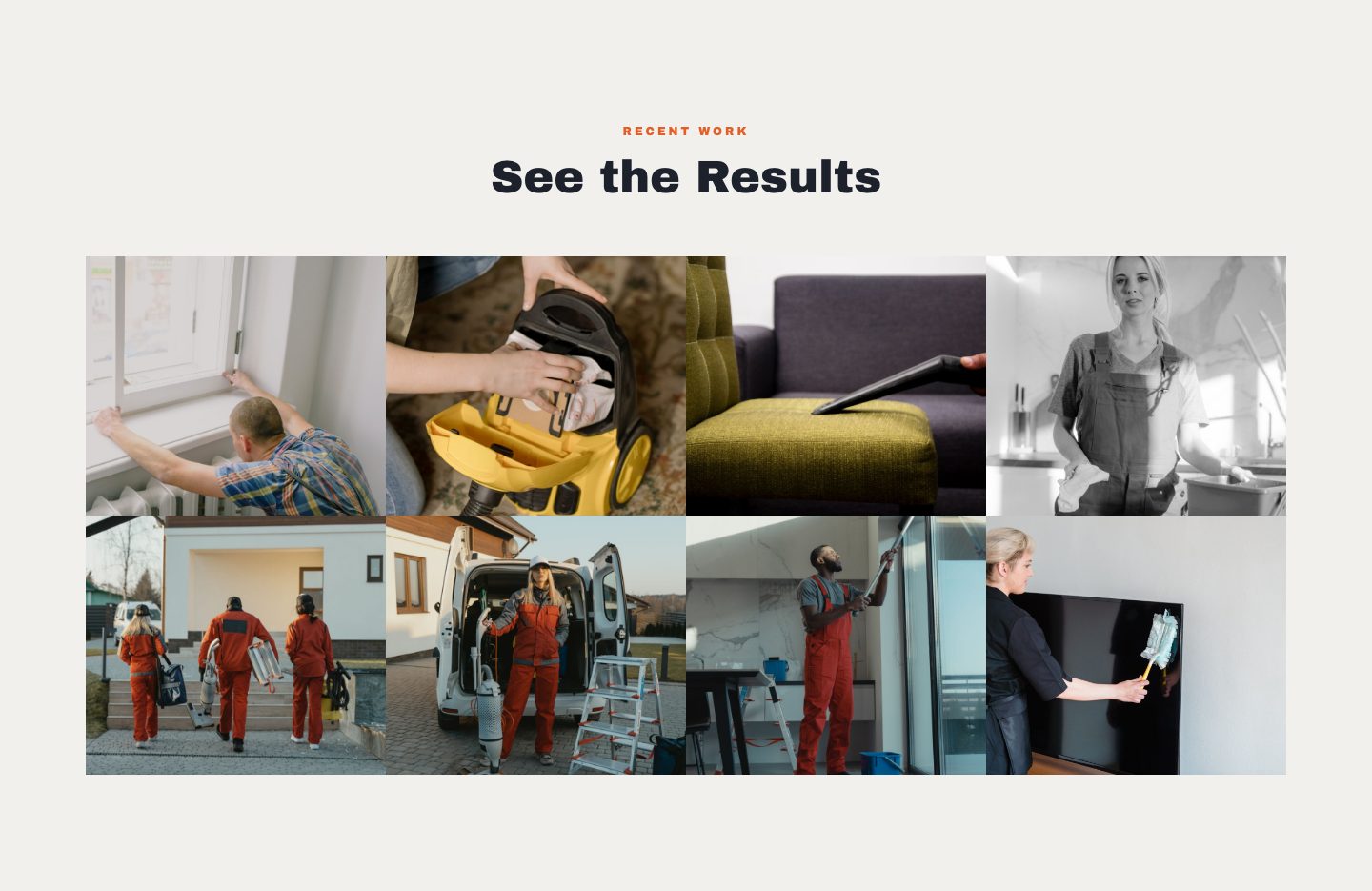
The recent work gallery. Eight tiles, close to square.
You, or you and the people who show up to the job, in front of the truck or a finished project. Look at the camera. This is the photo that turns a phone number into a person, so it should look like the person who will knock on the door.
The file your phone makes is the file to send. Do not resize, compress or filter it first. A big file can always be made smaller to fit the framework; a small one can never be made sharp again. A few megabytes per photo is normal.
JPEG (.jpg) is the safe format everywhere. Newer iPhones save HEIC by default, which is fine for shooting; for plain JPEGs, set Formats to Most Compatible in the Camera section of Settings. Most Android phones save JPEG already.
Upload them in the online form, straight from your phone. If you are stuck choosing between two, send the sharper one.
Photos are one part of the online form. The prepare page lists everything else to have ready, so the form takes 15 to 20 minutes instead of an evening.
$59 one-time setup, then $99/mo. for 12 mo. or $169/mo. with no commitment. No sales calls.